Security Reference
Maze Linux enables a layered security stack from first boot. This page lists
what is running, what is installed but waits for you, and how to check each
layer. (Package versions follow Arch — pacman -Q <pkg> shows yours.)
Security at a Glance
| Layer | Tool | Status on a fresh install |
|---|---|---|
| Mandatory access control | AppArmor | On — kernel + apparmor.service |
| Host firewall | firewalld (nftables) | On — public zone |
| Network attack detection | Maze Guard | On — maze-guard.service, tray app autostarts |
| System audit log | auditd | On — Maze rule set |
| Security-change alerts | Maze Sentinel | On — desktop notifications |
| Real-time malware protection | QLAM (qlamd) | Installed — you turn it on |
| USB device blocking | USBGuard via Maze Hardware | Installed — off |
| Hardware kill switches, panic mode | Maze Hardware, maze-panic | Available |
| Application sandbox | Firejail | Installed — firejail <program> |
| Rootkit detection | rkhunter | Installed — run by hand |
| Security audit | lynis | Installed — run by hand |
| SSH | sshd (hardened config) | Off — root login disabled, 3 auth attempts |
| Kernel hardening | sysctl | On — applied at boot |
| Boot integrity | Secure Boot + signed UKI | On — see Secure Boot |
| Disk encryption | LUKS2 | If you ticked Encrypt system in the installer |
AppArmor
AppArmor is a mandatory access control (MAC) system. It confines applications to the files and capabilities defined in their profile, limiting the damage if an app is exploited. Profiles shipped with packages are loaded automatically at boot.
How it's enabled:
- AppArmor is switched on through the kernel command line, which on Maze is
baked into the signed Unified Kernel Image — there is no bootloader config
to edit. The parameters are:
lsm=landlock,lockdown,yama,integrity,apparmor,bpf apparmor=1 security=apparmor apparmor.serviceis enabled and starts at boot.
Check status:
sudo aa-status
You can write custom profiles in /etc/apparmor.d/.
firewalld
firewalld manages the nftables rule set using a zone-based model. The default
zone is public: inbound connections are refused unless a service is
explicitly allowed, and everything you start yourself can go out.
Allowed inbound on a fresh install:
| Service | Port | Why |
|---|---|---|
ssh | 22/tcp | Pre-opened so SSH works if you enable it — sshd itself is off, so nothing listens |
dhcpv6-client | 546/udp | firewalld's default for the public zone (IPv6 addressing) |
maze-connect | 38271/tcp+udp | Maze Connect pairing and link |
Want nothing reachable at all? Maze Guard's Block incoming traffic switch
(on in its Home, Public WiFi and Paranoid profiles) sets the zone to DROP. Or
close the SSH port yourself:
sudo firewall-cmd --permanent --remove-service=ssh
sudo firewall-cmd --reload
Check active rules:
sudo firewall-cmd --list-all
Add a port permanently:
sudo firewall-cmd --add-port=8080/tcp --permanent
sudo firewall-cmd --reload
GUI: Maze Guard's Firewall and Protection pages, or firewall-config
(sudo pacman -S firewall-config).
auditd
The Linux Audit daemon records security-relevant system calls and file changes
into a structured log. Maze ships a rule set in /etc/audit/rules.d/maze.rules
that watches:
- Identity —
/etc/passwd,/etc/group,/etc/shadow,/etc/gshadow - Privilege —
/etc/sudoers,/etc/sudoers.d/, and every run ofsu/sudo - Kernel modules —
insmod,rmmod,modprobeand the module-loading syscalls - Time changes — clock-setting syscalls and
/etc/localtime - Network config —
/etc/hosts,/etc/hostname,/etc/NetworkManager/ - Logins —
/var/log/lastlog
sudo ausearch -k identity -ts recent    # recent account changes
sudo ausearch -k priv_esc -ts today     # sudo / su use today
sudo aureport                           # summary report
Maze Sentinel
Maze Sentinel turns the audit log into plain-language desktop notifications for the few changes that really matter on a desktop:
- a user account or group changed, or a new administrator (UID 0) account appeared
sudoerschanged- a new SSH key was added to
authorized_keys, or the SSH server config changed - a new SUID/SGID-root program appeared
Changes made by a package manager you ran (pacman, paru, makepkg) are logged
but not alerted. It runs as maze-sentinel.service; its log is
/var/log/maze-sentinel.log.
Maze Guard
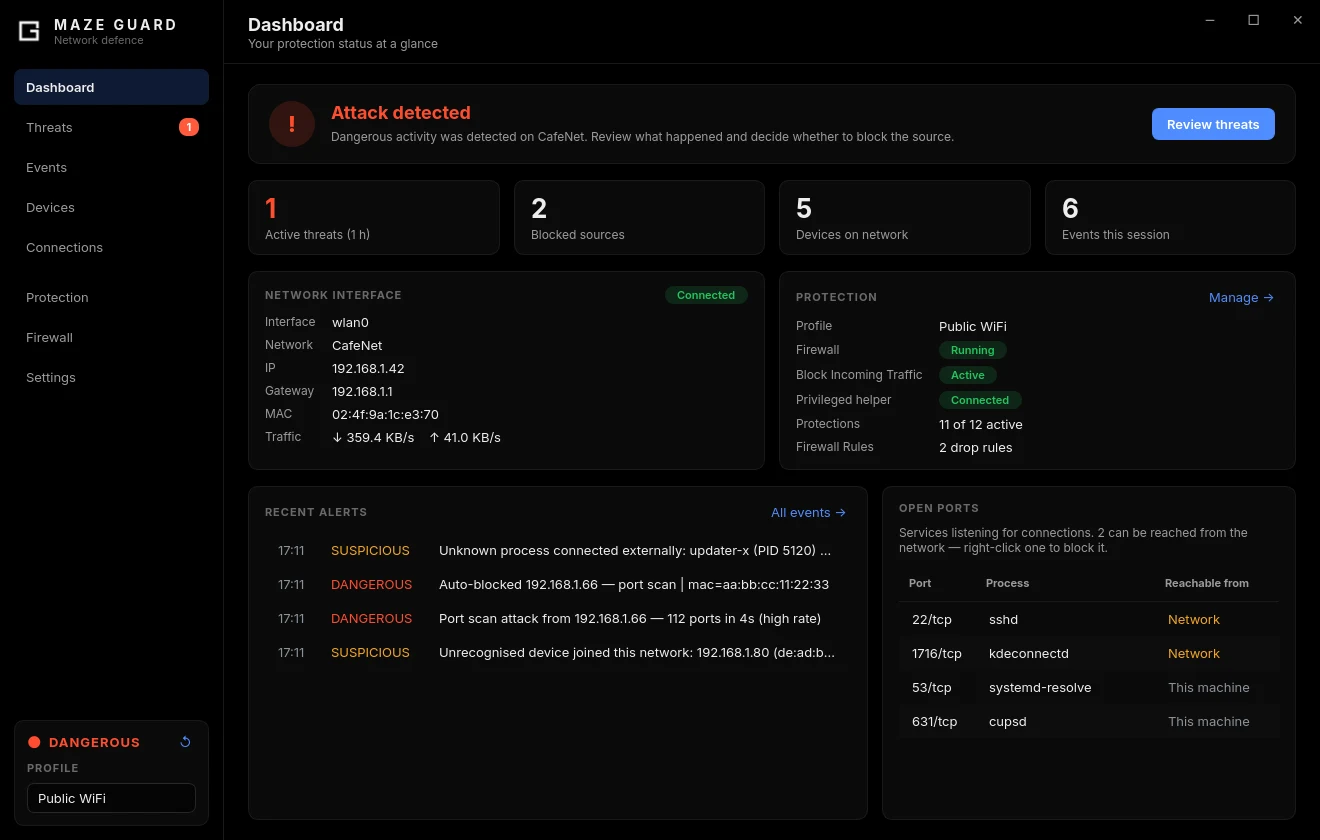
Maze Guard is Maze's own public Wi-Fi security monitor — a PyQt6 app
backed by the root helper maze-guard.service. It watches the network you are
on for attacks — ARP spoofing and other MITM attempts, port scans, rogue
access points, DNS poisoning, forged IPv6 router advertisements — and blocks
attackers through firewalld.
systemctl status maze-guard     # the root helper
maze-guard --doctor             # self-test every feature
Full details: Maze Guard.
QLAM
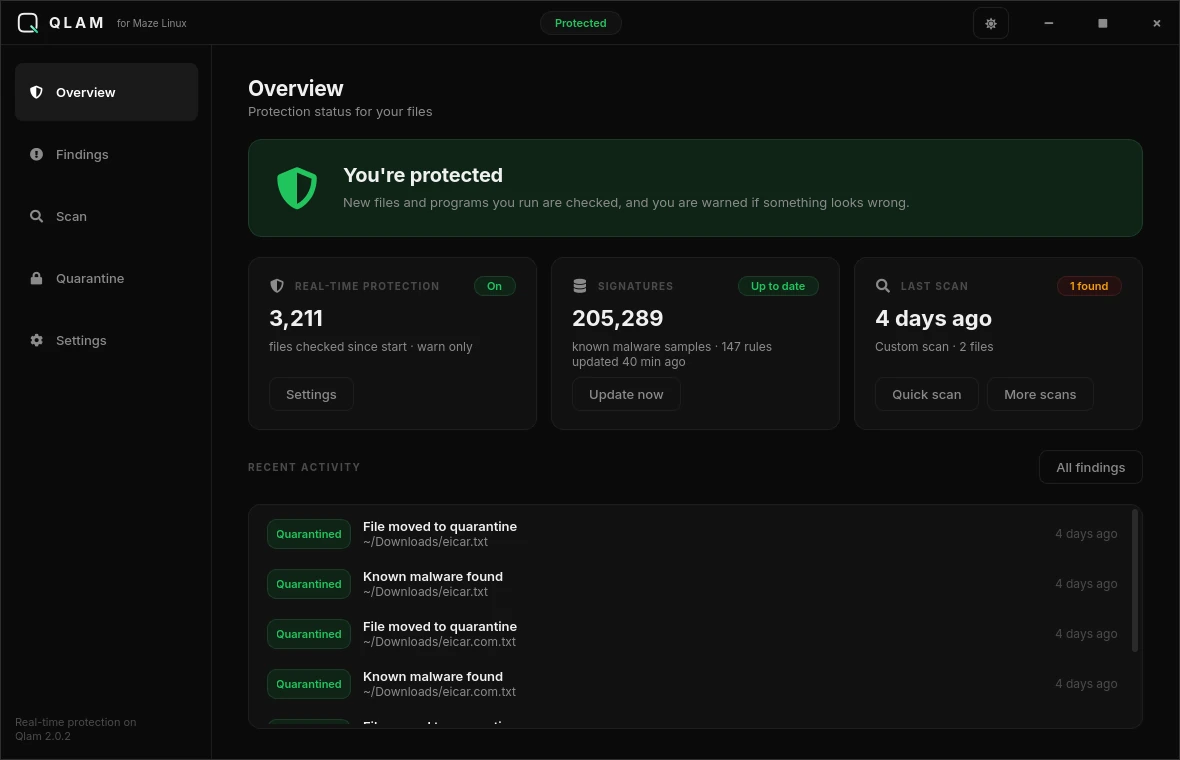
QLAM is Maze's own antivirus. It is not just a ClamAV front-end: a Rust
service (qlamd) checks new and changed files in the places a normal user can
write to — your home folder, /tmp, /dev/shm, USB drives — and every program
run from them, using:
- exact SHA-256 matches against known Linux malware samples (MalwareBazaar),
- YARA rules (QLAM's own + YARA Forge) for miners, botnets, rootkits, reverse shells, webshells,
- ClamAV signatures — optional. ClamAV is not installed on Maze; QLAM only
uses it if you install it yourself and run
clamav-daemon.
It warns; you decide: nothing is deleted or moved without you. Quarantine and trust are one click from each finding. Blocking known malware from running is available but off by default.
Real-time protection is off until you enable it:
sudo systemctl enable --now qlamd.service qlam-update.timer
sudo systemctl start qlam-update.service   # first signature download (~250 MB)
Until then the QLAM window shows "service not running".
Scans on demand — quick, home folder or a folder you pick — are in the QLAM window and work without the real-time service.
rkhunter
rkhunter checks for rootkits, backdoors and local exploits by comparing file hashes and looking for known suspicious patterns.
First run (baseline):
sudo rkhunter --update
sudo rkhunter --propupd
Periodic check:
sudo rkhunter --check
Warnings should be investigated. Many are false positives — --propupd updates
the baseline after you verify a change is legitimate.
lynis
lynis performs a security audit of your system configuration and produces a hardening score with specific recommendations.
sudo lynis audit system
The report is saved to /var/log/lynis.log and /var/log/lynis-report.dat.
Hardened SSH
The SSH server (sshd) ships with secure defaults in
/etc/ssh/sshd_config.d/00-maze-hardening.conf:
PermitRootLogin no— root login over SSH is disabled.MaxAuthTries 3,MaxSessions 2.AllowAgentForwarding no,AllowTcpForwarding no,X11Forwarding no— forwarding disabled.LogLevel VERBOSE— key fingerprints are logged for every login.
The SSH server is not enabled at boot. Enable it only when needed:
sudo systemctl enable --now sshd
Switch to key-only authentication. The Maze drop-in sets
PasswordAuthentication yes, and sshd uses the first value it reads — so
editing /etc/ssh/sshd_config has no effect. Add a drop-in that sorts before
Maze's instead:
echo 'PasswordAuthentication no' | sudo tee /etc/ssh/sshd_config.d/00-local.conf
sudo sshd -T | grep -i passwordauthentication   # should print "no"
sudo systemctl restart sshd
Disable the server again when not in use:
sudo systemctl disable --now sshd
Kernel Hardening (sysctl)
Maze applies kernel parameters at boot via /etc/sysctl.d/99-maze-hardening.conf.
These are active from first boot — no action required.
Kernel restrictions
| Parameter | Value | Effect |
|---|---|---|
kernel.kptr_restrict | 2 | Hides kernel pointers from all users |
kernel.dmesg_restrict | 1 | Only root can read dmesg |
kernel.yama.ptrace_scope | 1 | Restricts ptrace to parent/child processes |
kernel.unprivileged_bpf_disabled | 1 | Only root can load eBPF programs |
net.core.bpf_jit_harden | 2 | Hardens the eBPF JIT compiler |
kernel.kexec_load_disabled | 1 | Disables loading a new kernel at runtime |
kernel.sysrq | 4 | Limits SysRq to the keyboard-control function |
fs.suid_dumpable | 0 | Disables core dumps from setuid programs |
fs.protected_hardlinks | 1 | Prevents hardlink attacks in shared dirs |
fs.protected_symlinks | 1 | Prevents symlink attacks in shared dirs |
fs.protected_fifos | 2 | Blocks FIFO attacks in world-writable dirs |
fs.protected_regular | 2 | Blocks regular-file attacks in world-writable dirs |
dev.tty.ldisc_autoload | 0 | Stops automatic TTY line-discipline loading |
Network protections
| Parameter | Value | Effect |
|---|---|---|
net.ipv4.conf.all.rp_filter | 2 | Reverse-path filtering, loose mode — deliberate, so VPN and Tor routing keep working |
net.ipv4.tcp_syncookies | 1 | SYN flood protection |
net.ipv4.conf.all.accept_redirects | 0 | Ignores ICMP redirect packets |
net.ipv4.conf.all.secure_redirects | 0 | Ignores even "secure" ICMP redirects |
net.ipv4.conf.all.send_redirects | 0 | Does not send ICMP redirects |
net.ipv4.conf.all.accept_source_route | 0 | Rejects source-routed packets |
net.ipv4.icmp_echo_ignore_broadcasts | 1 | Ignores broadcast ping (smurf mitigation) |
net.ipv4.icmp_ignore_bogus_error_responses | 1 | Drops malformed ICMP errors |
net.ipv4.conf.all.log_martians | 1 | Logs packets from impossible addresses |
net.ipv6.conf.all.accept_redirects | 0 | IPv6 equivalent of the above |
net.ipv6.conf.all.accept_source_route | 0 | Rejects source-routed IPv6 packets |
net.ipv6.conf.all.use_tempaddr | 2 | IPv6 privacy addresses — outgoing connections use temporary addresses, not one derived from your hardware |
The
default.*counterparts of everyall.*entry above are set too, so interfaces appearing later inherit the same policy.
Also part of the baseline: multicast DNS and LLMNR are off in systemd-resolved
(the machine does not answer name lookups from the local network), and
systemd-oomd plus zram keep the desktop responsive under memory pressure.
Maze Control Center — Security and Hardening pages
Open maze-control-center: the Security page shows the live state of every
service listed here, and Hardening gives a security score (how many of the
hardening checks pass). Copyable commands let you start, stop or enable any
service from the terminal without memorizing systemctl syntax.
See also: Privacy Reference · Kill Switches · Known Limitations