Privacy Reference
Maze Linux ships a layered anonymity and privacy stack. The quiet layers (no telemetry, hardened Firefox, local-network silence) are on by default; the ones that change how your machine appears on a network — MAC randomization and Tor routing — are installed and wait for you to switch them on. This page explains each component and how to use it.
Privacy at a Glance
| Layer | Tool | Default State |
|---|---|---|
| MAC address randomization | Maze Cloak | Installed — you turn it on in the app |
| Anonymity stack (Tor / DNSCrypt / I2P) | Entropy Shield | Installed — you start it |
| Network attack monitor | Maze Guard | On |
| Local-network silence | mDNS + LLMNR off, Avahi masked | On |
| IPv6 privacy addresses | use_tempaddr=2 | On |
| Anonymous browsing | Tor Browser | Installed |
| Anonymous file sharing | OnionShare, HazeDrop | Installed |
| Anonymous group chat | Haze | Installed |
| Hardened browser | Firefox (enterprise policies) | Default browser |
| VPN | Proton VPN app, WireGuard, OpenVPN | Installed |
| Private messenger | Session | Installed |
| KDE telemetry | All KDE / Plasma usage reporting | Disabled |
| Network analysis | Wireshark, nmap, tcpdump, aircrack-ng | Installed |
| Tor daemon | tor (SOCKS proxy only) | Enabled at boot |
Not preinstalled: Mullvad Browser, Mullvad VPN and Brave are not on the ISO. Mullvad Browser installs from the Maze repository (
sudo pacman -S mullvad-browser); Mullvad VPN and Brave come from the AUR.No standalone DNSCrypt service.
dnscrypt-proxyandi2pdare installed (Entropy Shield needs them) but not enabled on their own — Entropy Shield starts them when you turn those layers on. The default resolver issystemd-resolved.
MAC Address Randomization — Maze Cloak
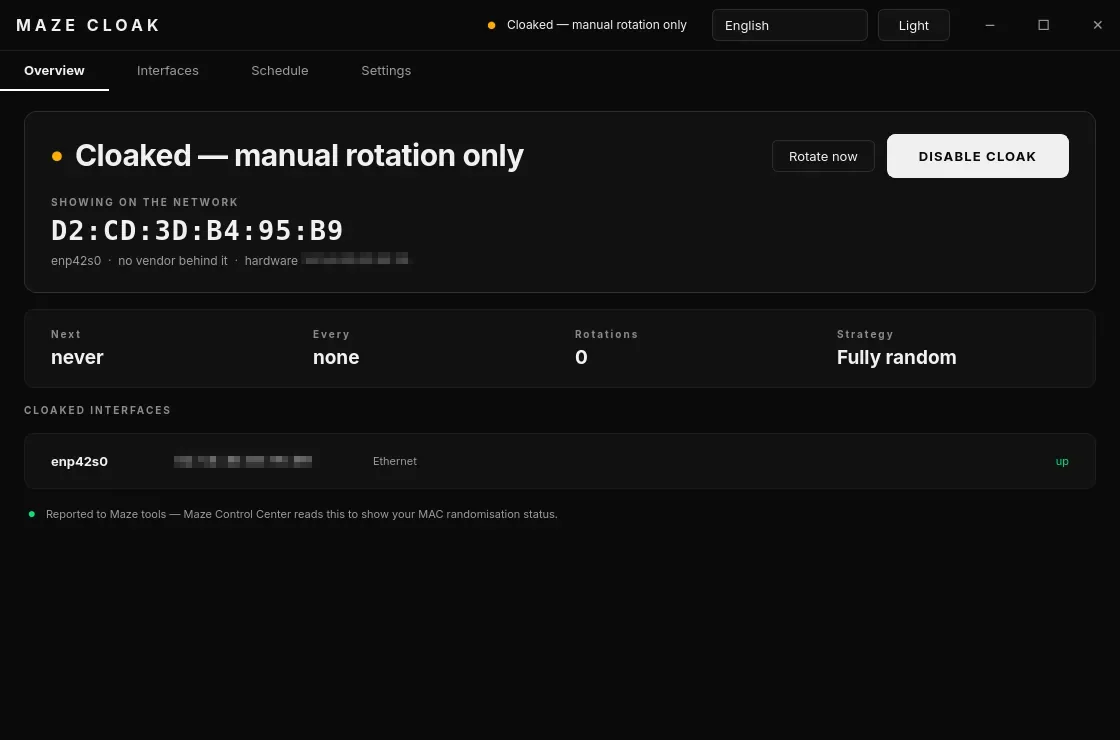
Every network card has a hardware MAC address that uniquely identifies your
device to every access point in range — whether or not you connect. On Maze this
is handled by Maze Cloak, a Maze-native app with a small root daemon
(maze-cloak.service) — not by macchanger.
Off until you turn it on. The daemon runs, but the cloak itself starts disabled: changing your MAC changes how your machine appears on every network it joins, so Maze leaves that decision to you. Open Maze Cloak from the menu (or its tray icon), pick the interface and switch it on.
What it does
Maze Cloak works in three layers:
- Scan randomisation — randomises the address used while scanning for networks, so you are not trackable just by looking for Wi-Fi.
- Connection randomisation — a different address per network you join.
- Scheduled rotation — periodically rotates the address while connected.
Scan and connection randomisation are done through a NetworkManager drop-in
(/etc/NetworkManager/conf.d/99-maze-cloak.conf, present only while the cloak is
on); scheduled rotation is done by the daemon with ip link, every 1 minute to
1 week (default 30 minutes). When you turn the cloak off, the burned-in address
is put back. Virtual interfaces (bridges, VPN, Docker) are never touched.
Address strategies
Three modes are available: fully random, keep my vendor prefix (blends in, but reveals your adapter's make), and random vendor prefix (the default — borrows a common consumer vendor's prefix).
VPN awareness
Maze Cloak pauses rotation while a VPN is up, so a rotation cannot drop your tunnel mid-session.
Using it
Maze Cloak is tray-first — a PyQt6 interface with English and Turkish, switchable
live. No password is needed: your user is in the maze group, which may write
its configuration. From the shell:
maze-cloak --status     # what the cloak is doing, per interface
ip link show            # link/ether is the current address
Encrypted DNS
Every DNS query is a potential privacy leak — your ISP can see every domain you resolve.
Maze does not run a standalone dnscrypt-proxy service. The package is
installed, and encrypted DNS is one of the layers Entropy Shield enables when
you start it (see below). Out of the box the resolver is systemd-resolved, and
Firefox uses its own DNS-over-HTTPS.
Entropy Shield
Entropy Shield is a Maze-native app that turns on Tor transparent proxy,
DNSCrypt and I2P — in any combination — from one window, with IPv6 leak
protection and a kill switch that disconnects and reconnects when a layer drops. Launch it from the menu or run entropy-shield.
Full details: Entropy Shield.
Tor
Tor routes your traffic through a volunteer-operated relay network with three hops, making it very difficult to trace traffic back to your IP address.
Tor Browser
The most private way to use Tor:
torbrowser-launcher
On first run it fetches the latest Tor Browser. Tor Browser is pre-hardened: JavaScript is restricted, fonts and canvas are fingerprint-resistant, no history is kept between sessions.
Tor Daemon (SOCKS proxy)
tor.service is enabled at boot. It is only a SOCKS5 proxy on
127.0.0.1:9050 — nothing goes through it unless an application is pointed at
it (or you start Entropy Shield's transparent proxy):
curl --proxy socks5h://127.0.0.1:9050 https://check.torproject.org/api/ip
Check it with systemctl status tor. Not using Tor? sudo systemctl disable --now tor.
OnionShare
Share files or host a web service accessible only over a Tor .onion address:
onionshare /path/to/file
The receiver accesses the .onion URL in Tor Browser. The file is never uploaded to a third-party server.
Browsers: Privacy Comparison
| Browser | Best for | Fingerprint resistance | Tor support |
|---|---|---|---|
| Firefox (hardened) | Daily use | High (hardened defaults) | Via SOCKS proxy |
| Brave | Everyday + Chromium compat | High (built-in shielding) | Via SOCKS proxy or Tor windows |
| Mullvad Browser | VPN users wanting Tor-Browser-level hardening | Very high | Designed for VPN, not Tor |
| Tor Browser | Maximum anonymity | Very high (shared fingerprint) | Native |
Firefox hardening details
Maze configures Firefox through enterprise policies
(/etc/firefox/policies/policies.json), not a prepared user profile. The
difference matters: policies apply to every profile, including new ones you
create, and users cannot silently undo them.
Disabled by policy:
- Telemetry and data collection
- Pocket, sponsored content
- Studies and experiments
Enabled by policy:
- Enhanced Tracking Protection
- Fingerprinting and cryptomining protection
- DNS over HTTPS (change the resolver in Settings if you prefer another)
Also set: the first-run page and homepage point at the Maze site. Firefox Accounts are not disabled, so you can still sync if you want to.
No extension required.
The comparison table above lists Brave and Mullvad Browser — note that neither is installed by default:
sudo pacman -S mullvad-browser maze-mullvad-browser-theme(Maze repository) /paru -S brave-bin(AUR).
KDE Telemetry
All KDE Plasma and application usage reporting is disabled by default in Maze. KDE's opt-in telemetry (User Feedback) is turned off in the Maze system configuration — no usage data is sent to KDE.
VPN
Proton VPN
The Proton VPN desktop app is installed (free or paid Proton account required). Launch Proton VPN from the menu.
Mullvad VPN — not installed
Not on the ISO. If you want it: paru -S mullvad-vpn-bin (AUR). For the Maze look,
add sudo pacman -S maze-mullvad-theme afterwards.
WireGuard
Import a WireGuard configuration file from your VPN provider:
sudo cp your-vpn.conf /etc/wireguard/wg0.conf
sudo wg-quick up wg0
Enable at boot:
sudo systemctl enable wg-quick@wg0
OpenVPN
Import an .ovpn file through System Settings → Wi-Fi & Networking → Add → Import VPN connection, or run it from the CLI:
sudo openvpn --config your-vpn.ovpn
Session — Private Messaging
Session is an end-to-end encrypted messenger with no account required (uses a Session ID instead of a phone number) and no central metadata server.
session-desktop
Network Analysis Tools
Wireshark
Capture and inspect network packets. The installer adds your user to the wireshark group, so you can capture without sudo.
wireshark
nmap
Scan for open ports on your own system or an authorized network:
nmap -sV -p 1-65535 localhost
aircrack-ng
Wi-Fi security testing. Use only on networks you own or are authorized to test.
tcpdump
CLI packet capture:
ip -br link              # find your interface name (e.g. wlan0, enp3s0)
sudo tcpdump -i wlan0 -n
Haze and HazeDrop
Haze — peer-to-peer group chat over Tor hidden services: no accounts, no logs, end-to-end encrypted (X25519 + ChaCha20-Poly1305), ephemeral sessions and a panic button. Others can join from Tor Browser without the app.
HazeDrop — anonymous, end-to-end encrypted file and text transfer over Tor
(Haze Protocol v2): one .onion link per share, optional password, expiry and
download limits. GUI, or from the shell:
hazedrop send file.pdf --once --expire 30m.
See Tools & Apps.
Maze Control Center — Privacy Tab
Open maze-control-center and select the Privacy tab to see:
- Current MAC address on each interface.
- Whether MAC randomization (Maze Cloak) is on.
- Whether the Tor daemon is running.
- Copyable commands for Maze Cloak, starting Tor, and launching Tor Browser.
Privacy Checklist
- Maze Cloak is switched on (
maze-cloak --status) - Firefox is the default browser and
/etc/firefox/policies/policies.jsonis in place - DNS-over-HTTPS is on in Firefox Settings (it is by default)
- WebRTC is disabled if you are not using video calls
- Proton VPN or WireGuard is configured if you use a VPN
- Tor Browser is used for sensitive browsing
- Session is used instead of SMS/WhatsApp for private conversations
- Maze Guard is running