Maze Linux 2026.11.26: Maze Ghost, Maze Capsule, Maze Vault and apps through Tor
· 2026.11.26
Six new default apps (Ghost, Capsule, Vault, Scrub, Glovebox, Terminal), any app through Tor in Entropy Shield 4.3, network-identity hiding in Maze Cloak, Qlam 2.2 with a behaviour monitor, 23 more networks in Maze Crypto, Arch and AUR in Maze Store, a third round of security fixes, and Linux 7.3.6.
Last release added things; this one adds a lot of them. Six new apps now come with every Maze install: a login that keeps nothing, encrypted capsules for your files, a password manager, a metadata cleaner, a sealed box for suspicious files and a terminal with a paste guard. Entropy Shield can now run any app through Tor, Maze Cloak hides more of your network identity, and a third round of security fixes touched almost every Maze app.
Highlights
- Maze Ghost: a passwordless login that keeps nothing and only speaks Tor.
- Maze Capsule: separate encrypted spaces for your files, no root needed.
- Maze Vault: a Bitwarden- and Vaultwarden-compatible password manager.
- Maze Scrub: shows what your photos and documents reveal, then removes it.
- Maze Glovebox: opens suspicious files in a sealed box with no network and none of your files.
- Maze Terminal: the new default terminal, with a paste guard and Tor and private tabs.
- Entropy Shield 4.3: run any app through Tor, fail-closed and without root.
- Maze Cloak 1.4: hides your hostname and network identity, and never exposes the hardware MAC.
- Qlam 2.2: archive scanning, a behaviour monitor and rootkit checks.
- Maze Crypto: 23 more networks, and lookups through Tor.
- Maze Store: Arch and AUR packages, with one update list.
- Maze Digispark: turn a cheap USB board into a panic key, a kill cord or a watch key.
- Third security round across more than 25 packages; the full list of fixed vulnerabilities and bugs is at the end.
Maze Ghost
Ghost is a second login on your computer that leaves nothing behind. Pick ghost on the login screen; there is no password.
- Memory-only home: a fresh tmpfs home is built from
/etc/skelat login and unmounted at logout. Nothing is written to disk. - Only Tor: the account's TCP and DNS go to a Tor of its own. UDP, IPv6 and local services are dropped. If the Tor-only firewall can't start, the login fails instead of running open.
- Clean exit: at logout and at boot, processes are killed and temporary files, core dumps, the account's journal files and saved Wi-Fi networks are deleted. A new MAC address is requested from Maze Cloak for every session.
- No hibernation and no core dumps for the session. The only thing that can persist is an encrypted Maze Capsule.
- Locked in: Ghost can't use services that act on the network for it (NetworkManager, ModemManager and others), the system sockets are hidden from it, and root never follows paths Ghost controls.
- A welcome window shows a live Tor check and warns about swap on disk.
- Other accounts are left alone: only Ghost's own traffic goes through the restricted firewall chains, so kernel WireGuard keeps working for everyone else.
Maze Capsule
Capsules are separate encrypted spaces built on gocryptfs (AES-256-GCM, encrypted file names). They are mounted as you through FUSE, so no root is needed, and each one is a portable folder that also opens with plain gocryptfs.
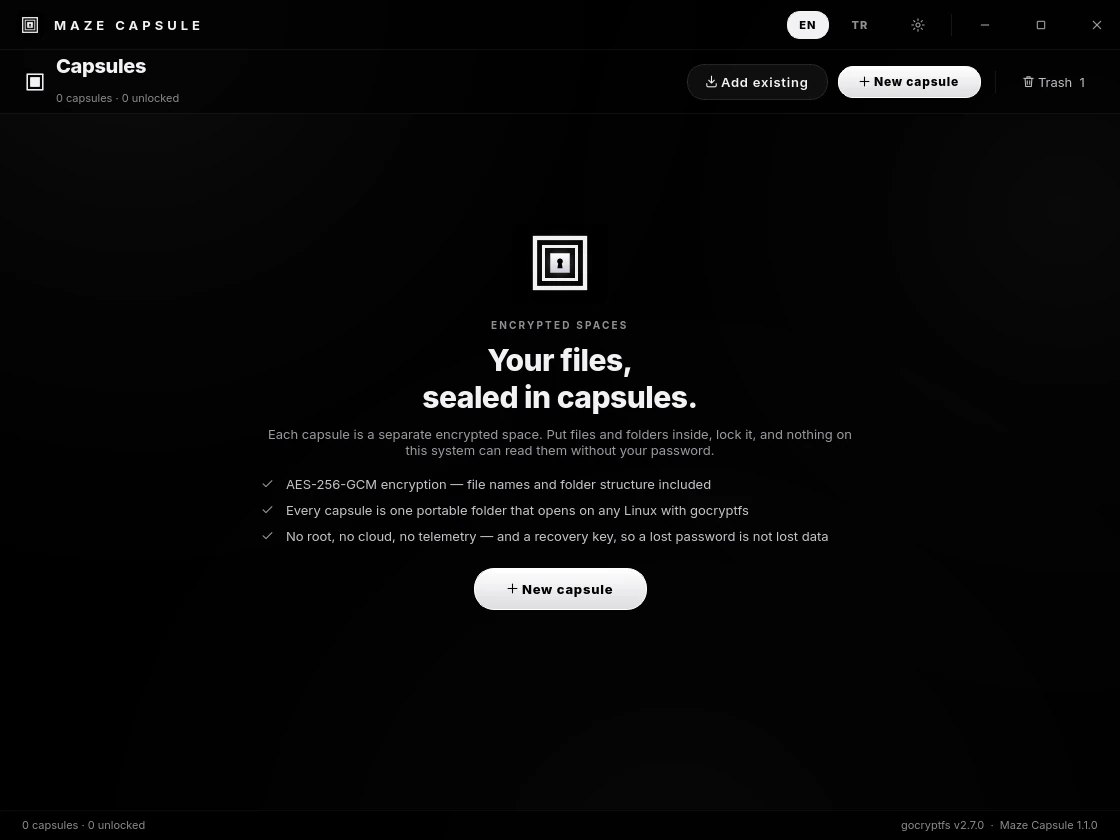
- Data safety first: deleting a capsule moves it to an in-app trash, and real deletion happens only from the trash after you type its name. A second copy of the wrapped key is kept, the recovery key is shown once and confirmed, and password changes are verified with a rollback.
- Sandboxed shell: a bubblewrap shell confined to one capsule, with no network by default.
- Encrypted
.capsule.tarexport and import, capsules on USB disks, read-only unlock and an integrity check. - Locks when you leave: capsules lock on idle and at logout. A systemd ordering cycle used to make the logout lock get dropped; it's fixed, so capsules really are locked after logout.
- A new toolbar layout, a full-width grid and a trash drawer. English by default, with a Turkish toggle.
Maze Vault
A client for Bitwarden, Vaultwarden or any compatible server, or a purely local vault in the same encrypted format. It contacts only the server you sign in to and has no telemetry.
- Bitwarden's cryptography, byte for byte: PBKDF2 or Argon2id, HKDF, AES-256-CBC with HMAC, per-item keys and RSA.
- Two-step login (authenticator, e-mail, YubiKey OTP), new-device verification, offline unlock from an encrypted cache and a session-only PIN that is wiped after 5 wrong tries.
- Logins, cards, identities, notes, folders, TOTP codes, a password generator and a trash.
- Safety checks: KDF minimums, protection against downgrade, HTTPS only, edits made on stale data are saved as a separate copy instead of overwriting, and the clipboard is cleared.
- Permanent delete really deletes now, including history snapshots and the backup file, and damaged data is never silently replaced.
Maze Scrub and Maze Glovebox
- Maze Scrub lists every metadata field it can read, grouped by what it reveals: location, personal details, device and IDs, dates and software. Then it cleans the file with mat2. It never loses an original (copy mode writes
name.cleaned.ext; replace mode moves the original to the Trash only after the clean file is written and checked). There's a Dolphin menu entry, and cleaning runs in a sandbox with no network that only sees the file being cleaned. - Maze Glovebox opens a copy of a file with your usual app inside an unprivileged bubblewrap box: no network, no real home, no D-Bus, sound or GPU, no capabilities. It adds a seccomp filter, an almost empty
/etc, its own Wayland socket and memory and process limits. Use it from Dolphin ("Open in Glovebox") or from a Qlam finding.
Maze Terminal
Maze Terminal is a QTerminal fork and is now the default terminal: Ctrl+Alt+T, F12 drop-down, Dolphin's "Open Terminal" and the dock all use it. Konsole and Yakuake stay installed.
- Paste guard: multi-line pastes are checked before they run.
- Tor tabs and private tabs, and the Maze OLED window.
- Other programs can no longer type into an open terminal over D-Bus without asking you first.
Maze Secure Boot 2.1
- shim updates reach your disk. When Arch ships a newer Microsoft-signed shim, Maze installs it only if your firmware hasn't revoked it and it would still boot Maze's kernels. The new shim first goes on trial: the recovery entry keeps the last shim that worked. If you boot through recovery, the new shim is rolled back by itself; after a normal Secure Boot start it is kept.
- New
maze-sb-mok-cleanup. It asks MokManager, at the next reboot, to drop the live-ISO key and old machine keys you no longer need. It never touches your current key, a key rotation in progress or keys that aren't Maze's, and only runs when every boot image verifies with your current key.maze-boot-checktells you when there is something to clean up. - Emergency shell only when it's safe. The password-less emergency shell is now only allowed on a disk you unlocked with your LUKS passphrase. You can force it on or off with
/etc/maze/sulogin-forceor/etc/maze/sulogin-never. maze-boot-checkchecks more: shims against your firmware's revocation (SBAT) list, initramfs hooks that don't match the disk encryption (encrypt vs sd-encrypt), and boot images matched by their real kernel version.
Entropy Shield 4.3: run any app through Tor
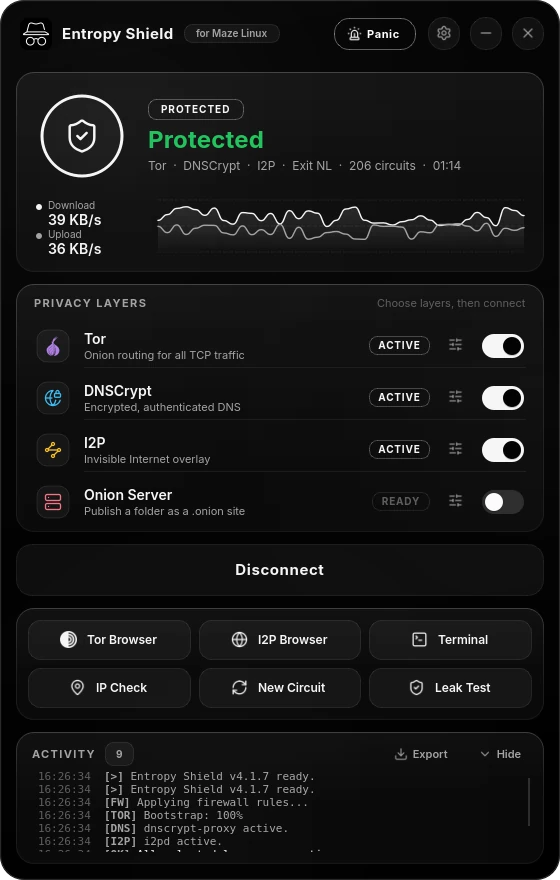
- Any app, through Tor: an app runs in its own network namespace with no real interface. Every TCP connection is carried to Tor, names are resolved inside Tor (
.onionworks), and UDP, IPv6 and local services are closed. If Tor stops, the app has no network. No root is needed. - Works without connecting: a private Tor starts for you and stops after the last app. While Entropy Shield is connected, apps use its Tor.
- One circuit per app, with an exit country and a "New identity" per app. There's a "Run any app through Tor" picker, a "Running through Tor" panel and a Dolphin "Run through Tor" entry.
- 4.2: a new monochrome frosted-glass interface with five themes and a real icon set.
- 4.1.7: the kill switch no longer leaks mid-stream traffic from older connections, coexists with WireGuard, OpenVPN and Tailscale, and rolls back cleanly on shutdown.
- 4.3.1: per-app rules only apply to the user who created them, so nobody can exempt root, Ghost or another user from the kill switch.
Maze Cloak 1.4
- Network identity: your hostname, DHCP client ID, IPv6 identifiers and LLMNR/mDNS announcements are hidden, each with its own switch in Settings (on by default).
- A new address each time: a "per network, new after reboot" mode.
- Leak audit: every 30 seconds Cloak looks for things it can't fix itself (hidden SSIDs, profiles that override a layer, Avahi) and lists them in a new Overview card.
- The real MAC never appears: a new early service randomises every interface before NetworkManager starts, so even the first connection of a boot uses a random address.
Qlam 2.2
- Inside archives: zip, jar, tar, deb, rpm and compressed streams are scanned, nested, with strict limits.
- Behaviour monitor: every 10 seconds, running programs are checked for running from memory or a deleted file, from hidden temp folders, posing as kernel threads, reverse shells and cryptominers. It only reports; it never stops a process.
- Rootkit checks with each scan:
ld.so.preload, processes hidden from/procand missing kernel modules. - More feeds and rules: ThreatFox, URLhaus and 15 new rules (Mozi, BPFDoor, Kinsing, TeamTNT, Sliver and more), plus scored ELF heuristics.
- Scheduled scans of every user, by default a weekly quick scan on mains power.
- Better updates: broken downloads resume where they stopped, and Settings shows live progress.
- Safer by design: a poisoned feed can no longer stop a system binary, because root-owned files under
/usrare only reported. Updates can go through a proxy, and an unreachable proxy stops the update instead of going direct.
Maze Crypto and the Coin Tracker
- 23 more networks: XRP Ledger, Dogecoin, Bitcoin Cash, Cardano, TON, Stellar, Polkadot, Cosmos Hub, NEAR, Algorand, Tezos, Kaspa, Dash and Zcash, plus Linea, zkSync Era, Scroll, Mantle, Gnosis, Sonic, Cronos, Celo and Ethereum Classic. Still keyless and read-only. The secret-key formats of the new chains are recognised and refused.
- XRP addresses were being rejected as having a bad checksum; fixed.
- Through Tor: address and xpub lookups use a local Tor when one runs. The Android app does so by default.
- The Android app no longer freezes after a widget update.
- The Coin Tracker widget downloads logos only over HTTPS.
Maze Store and Maze Connect
- Maze Store 1.7: search the Arch repositories and the AUR, install with confirmation, and update a single package with a signature check and no partial upgrades. One Updates page lists Maze, AUR and Arch updates together, and checking for them needs no root.
- Maze Connect 1.6: an optional KDE Connect switch, for people who'd rather not install the APK or who have an iPhone. It drives the system
kdeconnectdand is off until you turn it on. - Maze Connect now refuses remote input while the screen is locked, refuses two simultaneous admin approvals (and warns you), and refuses file names with invisible or direction-changing characters.
Maze Digispark: hardware keys
maze-digispark turns cheap Digispark (ATtiny85) USB boards into Maze hardware keys. No driver is needed: the flashed board is an ordinary USB device that never presses a key, and Maze recognises it by its name and a random serial number of its own.
- Panic key: plug it in and
maze-panicruns. - Kill cord: keep it plugged in on a short cord; if it's pulled out,
maze-panicruns at once. One per machine. - Watch key: plug it in when you leave your desk. The screen locks, and after 20 seconds Maze starts watching. Every key press, mouse or touchpad touch, wrong password, plugged-in USB device and wake from sleep is recorded, with a photo if the camera is on. Plug it in again when you're back to end the watch and see a summary.
maze-digispark flash panic     # or: flash cord / flash watch
maze-digispark watch-report    # report of the last watch
It adds no setuid file, no sudoers or polkit rule and no root service. Panic actions run in your own session, so maze-switchd accepts them. The watch log and photos stay in your home folder, readable only by you.
Good to know: the board's bootloader waits about 5 seconds after it's plugged in, so the panic key fires that much later (the kill cord isn't affected). A USB ID can be copied, so this is not a security key; don't use it to unlock or for two-factor login. With the USB kill switch on, new devices are blocked, so the panic key won't work unless you allow it with sudo maze-digispark usbguard on.
It's not installed by default: sudo pacman -S maze-digispark arduino-cli. The README walks you through setting up arduino-cli and flashing your first board.
Wallpapers and look
- New Atatürk wallpaper set, and a refreshed Haze and HazeDrop logo family with proper icon sizes.
- Maze Donate shows a gentle reminder at most three times (after 7, 30 and 60 days), never on the live ISO, with a "don't show again" button.
- Maze Mullvad Theme, a theme for the Mullvad VPN app and the Mullvad Browser that turns navy tones grey (not installed by default).
Live ISO
- Boots the LTS kernel. On some NVIDIA-only desktops (an RTX 5060 with nouveau, for example) the mainline 7.3 kernel left the screen black where earlier ISOs worked. An installer has to come up on every machine, so the live ISO now starts Linux LTS 6.18. The installed system still gets both kernels and boots the newest one by default.
- A boot menu. The ISO shows a short menu (3 seconds) before it starts: LTS kernel – recommended (the default), Safe graphics (nomodeset) for machines that still show nothing, and Newest kernel – for very new hardware. Every entry is a Maze-signed Unified Kernel Image, so the menu works with Secure Boot on.
- Our own shim package. The Microsoft-signed shim on the ISO now comes from a Maze package instead of an AUR build.
- No SSH server on the live ISO, and AUR apps on it are built only at commits pinned by Maze (already listed under security fixes).
- Smaller and lighter: Steam, Discord, Upscayl, Session and Claude Code are no longer on the ISO (see "Package changes").
Installer
The install steps were reworked end to end, with a new mazedeploy module that shows a summary of every step, its time and any warnings at the end of the install. The Options page has three new groups:
- VPN (optional): Mullvad VPN (recommended; paid, no e-mail needed) or Proton VPN (has a free plan). Neither is ticked: a VPN is your choice, and both need an account. If you tick Mullvad, its service is enabled for you.
- NVIDIA proprietary driver (optional, off by default): for RTX 20xx / GTX 16xx and newer. Older cards stay on the open-source nouveau driver. Needs an internet connection during the install.
- LTS kernel by default: pick it if the screen stays black after install. Both kernels are always installed. On a machine whose only graphics card is NVIDIA without the proprietary driver, the installer picks LTS by itself. You can switch later in the Kernel Switcher (
maze-kernel) without reinstalling.
The slides shown during the install have a new black-and-grey maze design, in English and Turkish.
Upscayl and Session were removed from the Applications list; ONLYOFFICE and Joplin are still there.
Smaller changes
- Maze Wallpaper 1.5.1: updates to the library, gallery, preview and settings views and to the Plasma wallpaper plugin.
- Maze Connect for Android 0.17.1: a find-my-phone ringer, live status and media notifications, and an update checker. It also refuses two simultaneous admin approvals and unsafe file names, like the desktop app.
- Maze Security (Android): release builds are now minified and shrunk.
- AI Usage 2.0.1: agents you've unticked in Settings are skipped completely; their tokens aren't read and their providers aren't queried.
- Gaze: now licensed GPL-3.0-only.
- Maze Snapshots:
maze-rollbackcan no longer pick the wrong snapshot when names contain spaces or special characters. - Maze Tools 2.2.2:
maze-auditalso checks the Ghost account and no longer warns about backup config files, and Maze Control Center has its own icon.maze-install-vmwarenow installs kernel headers for every installed kernel and builds VMware's vmmon/vmnet modules for each, so re-running it also repairs a "Could not open /dev/vmmon" install. - Boot and shutdown: the default wallpaper's fill colour is black so the first login doesn't flash white, and
plasmashellstops within 5 seconds instead of holding shutdown for 40. - Maze Python 1.1: pip-only libraries are installed from exact, hash-checked files with no package index.
- Maze Store has new Haze and HazeDrop icons.
- Maze Meta: Maze Terminal, Maze Scrub and Maze Glovebox, Maze Capsule and Maze Vault are listed as dependencies, so a normal upgrade pulls them in.
- mazelinux-keyring 20261126: the Maze signing key no longer expires, and the keyring's trust file now lists the key by its full fingerprint, which removes an "invalid fingerprint" error during install and keyring setup.
Package changes
- Added by default:
maze-ghost,maze-capsule,maze-vault,maze-scrub,maze-gloveboxandmaze-terminal. - Changed: Maze Terminal is the default terminal; Yakuake no longer starts at login. Konsole and Yakuake are still installed. The live ISO now boots the LTS kernel (see "Live ISO" above).
- Now an installer option instead of preinstalled: Proton VPN. Mullvad VPN is a new option next to it. Both are off by default.
- Removed from the default install: Steam, Discord, Upscayl, Session and Claude Code. Steam and Discord are one
sudo pacman -S steam/sudo pacman -S discordaway; the 32-bit Vulkan drivers Steam needs are still on the ISO. Upscayl and Session are still in the AUR (paru -S upscayl-bin/paru -S session-desktop-bin).
| Component | 2026.10.26 | 2026.11.26 |
|---|---|---|
| Linux | 7.2.11 | 7.3.6 |
| Linux LTS | 6.18.58 | 6.18.65 |
| systemd | 262.1 | 262.2 |
| PipeWire | 1.6.10 | 1.6.11 |
| Firefox | 158.0.1 | 161.0 |
| Thunderbird | 158.0 | 160.0 |
| Ollama | 0.40.11 | 0.40.18 |
| Tor | 0.4.9.14 | 0.4.9.17 |
| SOF firmware | 2026.09.2 | 2026.09.2 |
Upgrading
Already on Maze? Update as usual; the new apps come in with maze-meta:
sudo pacman -Syu
sudo maze-selftest
Maze Cloak's new network-identity layers are on by default after the upgrade. You can turn each one off under Settings → Network identity.
Qlam needs a free abuse.ch Auth-Key. abuse.ch now requires one for its known-malware lists (MalwareBazaar, ThreatFox, URLhaus). Without it those lists aren't updated; Qlam's own rules keep working. Get a key at auth.abuse.ch and paste it in Qlam → Settings → Signatures.
maze-guardd is now maze-switchd. The panic and kill-switch service, its client (maze-switchctl) and its socket (/run/maze/switch.sock) were renamed. The upgrade carries an enabled service and its settings over by itself; only your own scripts that call the old names need changing.
Maze Connect opens KDE Connect's ports once. When you upgrade from a version before 1.6, the KDE Connect ports (1714–1764) are opened in firewalld so the new KDE Connect switch works. If you don't use KDE Connect, close them:
sudo firewall-cmd --permanent --remove-service=kdeconnect && sudo firewall-cmd --reload
If a Ghost login goes straight back to the login screen, the Ghost session couldn't be set up, most often because its Tor-only firewall couldn't start. The reason is in the log:
journalctl -b -u 'maze-ghost-session@*'
Apps that left the ISO stay installed. Upgrading doesn't remove Steam, Discord, Proton VPN, Upscayl, Session or Claude Code from an existing install; they were only dropped from new installs.
Maze Linux has a new home. The website is now at mazelinux.com.tr and the package repository at https://repo.mazelinux.com.tr/packages. The old addresses keep working, so you don't have to change anything. Read the announcement.
New installs: the ISO is 4.3 GB (mazelinux-2026.11.26-x86_64.iso). Download it here.
Fixed vulnerabilities and bugs
Maze is a security distribution, so here is what we fixed this month, not just that we fixed it. Most of these came out of our own audit of every Maze package. Everything below is fixed by a normal sudo pacman -Syu, except the installer and live ISO fixes, which apply to new installs.
Isolation and privileges
- Entropy Shield 4.3.1: a local user's per-app routing rules weren't limited to that user, so they could exempt root, the Ghost account or another user from the kill switch. Rules now apply only to the user who made them.
- Entropy Shield 4.1.7: the root daemon followed symlinks in the user's home folder, bridge lines could carry Tor directives other than
Bridge, and a leftover Tor was killed by a loose name match. - Maze Ghost 1.0.5: root followed paths that Ghost controls in its persistent folder; Ghost could ask system services (NetworkManager, ModemManager, hostname, time, printing) to use the network for it, outside Tor; system sockets (resolved, Avahi, CUPS, Docker, Podman, libvirt, Mullvad, Tor, Entropy Shield) were reachable from the session; and session cleanup didn't stop at files Ghost owned.
- Maze Capsule 1.1.0-3: a program in the capsule shell could type commands into the terminal it was started from (TIOCSTI), and capsules could stay unlocked after logout because of a systemd ordering cycle.
- Maze Terminal 1.1.1: any program in your session could type into an open terminal over D-Bus, and a multi-line paste into a program without bracketed paste skipped the paste guard.
- Maze Glovebox 1.0.0-2: the box had no seccomp filter, allowed nested user namespaces, saw more of
/etcthan it needed, shared an untagged Wayland socket and had no memory or process limits. Copying a file in could follow a symlink into/procor open a FIFO or device. - Maze Scrub 1.1.0-2: mat2, exiftool and ffmpeg read untrusted files outside a sandbox. They now run with no network, a read-only system and only the file being cleaned.
- Maze Guard 2.20.5: reloading firewalld silently wiped Maze Guard's runtime blocks, and the service held
CAP_DAC_OVERRIDEandCAP_FOWNER, which it didn't need. - Linux Chan AI 1.1.5-2: commands run by the assistant had network access and could see
/homeand mounted drives; obfuscatedsudoorsucalls got past the escalation check; and model output went through an unsafe XML parser andshell=True. - Maze AI 1.23.3: recursive reads (
grep -r,rg,ag), brace expansion and command substitution could reach secrets without approval; many short web fetches could get past the exfiltration check one at a time; credential stores for gh, cargo, rclone, gcloud, terraform, vault, Thunderbird, NetworkManager and fish history weren't guarded; some writing forms ofuniq,hostname,dateandjournalctlwere approved automatically; and untrusted XML was parsed unsafely. - Qlam 2.2.4-2: the folder walk could be raced (TOCTOU) so that a different file was opened than the one listed, and a poisoned signature feed could make Qlam block or quarantine system programs under
/usr. - Maze Secure Boot 2.0.2-4: the MOK signing key and its folder weren't forced to be root-only.
maze-boot-checknow fixes that and warns when the key sits on an unencrypted disk. New keys are RSA-3072. - Maze Vault 0.1.1-2: permanently deleted items survived in history snapshots and the
.json.bakbackup, and damaged UTF-8 was silently replaced, so the next save could destroy data. - Ledger udev rules 20240212-2: the hardware wallet's device was
0666, so any account, including the guest, could talk to a plugged-in Ledger. Now only the user at the seat can. - Maze Sentinel (maze-tools 2.2.1): its log, which holds raw audit records, was readable by every user.
Chat and file sharing
- Haze 2.12.2-3: any participant could edit or delete other people's messages and slip file chunks into someone else's transfer; messages, file names and system lines were rendered as rich text; guests could trigger panic for the whole room; the password lockout could be used to lock everyone out; joining used a reusable, unsalted password hash; everyone shared one key, so a kicked user could still read new messages;
/api/renewworked without authentication and showed exception text; andwipe_stringdidn't actually wipe. - HazeDrop 1.5.2-3: the link key was written to history when a download failed; chunks weren't bound to their position, so reordering, replay and truncation went unnoticed; anyone's wrong guesses could burn a password-protected link; and the web page inserted error text as HTML.
- Haze mobile 1.1.0: someone could take over another person's nickname; host passwords could be guessed without throttling and were compared in non-constant time; the app's file provider exposed its whole files folder, the vault included; and invalid Base64 crashed the client.
- Maze Connect 1.6.0-3 and Android 0.17.1: two admin approval requests arriving at once could race each other; remote input worked while the screen was locked; and file names with direction overrides or invisible characters could hide a file's real name.
Leaks
- Entropy Shield 4.1.7: TCP connections opened before connecting could keep sending with your real IP; iptables rules sat behind existing ACCEPT rules; IPv6 wasn't always blocked; I2P-only mode on nftables let direct connections through; DNSCrypt-only mode let DNS over TLS/QUIC (port 853) through; and the update check went over the clearnet at start-up.
- Maze Cloak 1.4.0: the first connection after boot could use the hardware MAC address, and your hostname, DHCP client ID and IPv6 identifiers were visible on the network.
- Maze Crypto 0.6.0-2 and Android 0.8.1: address lookups left from your clearnet IP, and settings and the database weren't limited to your user.
- Maze Wallpaper 1.5.1-2: media mode fetched cover art from YouTube and Spotify servers over the clearnet.
- SentinAI 1.7.0-3: OSINT requests could go out directly, and a username could be read as a command-line option.
- Coin Tracker 1.0.0-2:
file://,ftp://andhttp://logo URLs were accepted. - AI Usage 2.0.1-2: unticked agents still had their tokens read and their providers queried.
- Qlam 2.2.4-2: updates sent a Qlam-specific User-Agent and had no proxy option. Now the User-Agent is generic, a proxy can be set, and an unreachable proxy stops the update instead of going direct.
- Maze Security (Android) 1.0.0: scan targets and results could end up in cloud backups, and a target starting with
-reached nmap, hydra or medusa as an option.
Supply chain and defaults
- Live ISO: no longer starts
sshd. - Installer 2.2.0 and ISO: AUR apps were built from whatever their latest commit was. They are now built only at a commit pinned by Maze.
- Maze Python 1.1.0-3: pip-only libraries were fetched from the package index. Each is now one exact file checked against its SHA-256.
- Ledger Live: new releases are checked against Ledger's published hashes before we update.
- Hardening 1.0.0-11: stricter
sysctldefaults (legacy_tiocsti=0,perf_event_paranoid=3,unprivileged_userfaultfd=0,io_uring_disabled=1,tcp_rfc1337=1) andsshddefaults (no keyboard-interactive or empty-password login,LoginGraceTime 30, and the Ghost account is denied).
Bugs
- Maze Ghost 1.0.2: logging in as Ghost went straight back to the login screen.
- Maze Ghost 1.0.3: the Ghost firewall dropped kernel WireGuard traffic for every account, not just Ghost.
- Entropy Shield 4.1.7 and 4.2.1: helper processes froze once their output pipe filled up, the app didn't notice a dead daemon, the UDP leak test counted a timeout as "blocked", and Settings overflowed on wide-font themes.
- Qlam 2.2.1–2.2.4: the BotLoader rule flagged Qlam's own source code, large feed downloads failed when the connection broke, and Overview cards changed size during updates.
- Maze Crypto: XRP addresses were rejected as invalid, and the Android app froze after a widget update.
- Maze Store 1.7.1: crashed when an install terminal was closed.
- Maze Terminal 1.1.1: selecting while scrolling up lost the start of the selection.
- Maze Snapshots 1.1.0-8:
maze-rollbackcould pick the wrong snapshot when names had spaces or special characters. - Maze Sentinel 2.2.1: false alarms from btrfs, from removing a missing sudoers file and from package scripts.
- Maze Secure Boot 2.0.2-4: kernel updates could end in a false "Failed" while the boot image was still being built.
- maze-audit 2.2.2: false warnings for backup config files and a wrong
pacman -Dkresult. - Maze Guard 2.20.5: KDE Connect's traffic was reported as coming from an unknown program.
- Maze Scrub 1.1.0: Turkish upper case turned
iintoIinstead ofİ. - Desktop: the first login flashed white before the wallpaper loaded, and
plasmashellheld every shutdown for 40 seconds. - Installer 2.2.0: the check for an installed NVIDIA driver never matched (one missing package name made the whole test fail), so the initramfs of NVIDIA machines wasn't set up for the NVIDIA driver.
- Installer 2.2.0: the final boot check could silently skip itself because reading the kernel version out of the boot image failed; it now always runs and also respects an LTS default.
- mazelinux-keyring 20261126: the trust file used a short key ID, so GnuPG rejected it with "invalid fingerprint" during keyring setup.
Thank you, Nitrokey
This is the first release since Nitrokey became our first sponsor. Nitrokey sent us a Nitrokey 3C NFC and a Nitrokey HSM 2 free of charge, and we're putting them to work: hardware security key support for Maze Vault and Maze Capsule, and keeping the release signing key on dedicated hardware instead of on a disk. Neither has shipped yet; we'll write about each one here when it does.
As always, sponsorship changes nothing in the system itself: no preinstalled software, no changed defaults, no tracking. Thank you, Nitrokey, for supporting an independent distribution.
Maze Linux is ad-free and telemetry-free, and it runs on donations. Support the project